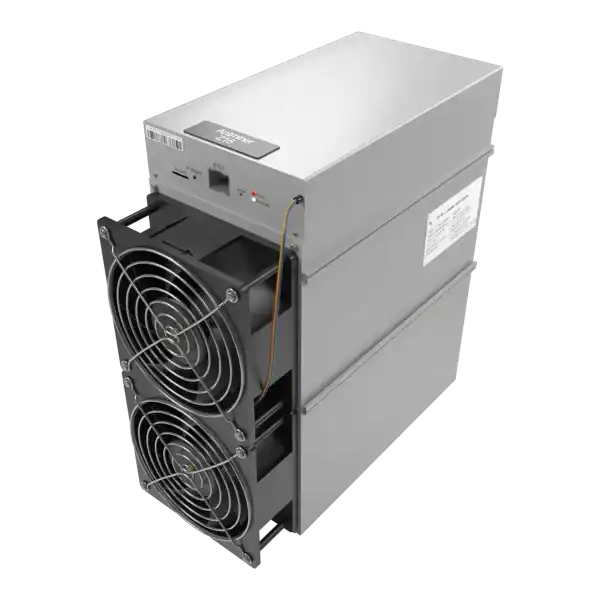
Antminer S9 HiveOS tuning can extend the useful operating range of an old SHA-256 miner. But it cannot make inefficient or damaged hardware economical by itself. The decision depends on the exact S9 variant and control board, measured wall power, accepted pool hashrate, electricity price, cooling, firmware source, developer fee and a tested recovery route.
Treat every profile as a starting point, change one variable at a time and judge the result over a representative run rather than a dashboard snapshot.
Antminer S9 HiveOS tuning in simple English
Antminer S9 HiveOS tuning is worthwhile only when the exact hardware is supported, the unit is healthy and measured efficiency fits the tariff and operating objective.
Simple example
A mining technician is checking Antminer S9 HiveOS tuning. The two figures most likely to change the answer are accepted terahashes per second and wall power after the developer fee and stability losses.
Key terms in plain English
ASIC:
A computer built to do one specialised job. A mining ASIC is designed for a particular proof-of-work algorithm.
Hashrate:
The amount of mining work a machine attempts each second. More hashrate does not guarantee more profit.
Efficiency:
How much electricity a miner uses for a set amount of work. Lower joules per terahash usually means better efficiency.
Wall power:
The electricity measured at the socket or supply. It includes losses that a headline chip figure may leave out.
Mining pool:
A service that combines work from many miners and shares rewards using stated rules.
Decide what tuning is meant to achieve
An S9 can be tuned for a lower electricity demand, a particular hashrate, quieter operation or the best accepted work per kilowatt-hour. These are different objectives. Write down the target before changing firmware.
For an electricity-limited site, an efficient lower-power profile may keep more units running inside a fixed circuit. For a site with exceptionally low-cost power, a higher profile may be commercially reasonable if the PSU, wiring and cooling have enough margin. Neither case justifies running unstable hardware.
The useful metric is accepted SHA-256 work after fees and rejects divided by measured energy. A local hashrate that never reaches the pool, or a higher hashrate created by excessive resets, is not an improvement.
Quick reference for Antminer S9 HiveOS tuning.
Confirm the exact miner and control board
Hiveon’s current knowledge base lists custom firmware for Antminer S9, S9i and S9j. Its wider ASIC Hub support list includes other Series 9 machines. But that does not mean the same firmware image can be flashed to them.
Read the nameplate and original system page, then photograph the control board, hashboard labels and PSU. Record the stock firmware version, board type, number of chains, chip count and any previous repair.
Do not use an image merely because the file name contains S9. The S9k and S9 SE have different support paths, and a mismatched image can leave the control board unable to boot. If the machine has an unknown or modified board, stop until it is positively identified.
Antminer S9 pre-flash record
Item
Record
Reason
Model and variant
S9, S9i or S9j plus nameplate
Confirms stated image support
Control board
Type, revision and recovery port
Determines installation and rollback
Hashboards
Serials, chains and chip health
Separates an existing fault from tuning
PSU
Model, rated output and connector condition
Sets the safe power ceiling
Stock baseline
Wall watts, accepted hashrate and temperatures
Allows an honest comparison
Use the right firmware source and understand the fee
Download Hiveon firmware through the authenticated Hiveon account or its documented download domain. Verify the model, release information and any published checksum. Do not get mining firmware from a forum attachment, file-sharing site or reseller bundle.
Hiveon states that its custom S9, S9i and S9j firmware charges a 2 per cent developer fee. That fee is collected through mining activity and must be included in the economic comparison. Firewalling the fee destination is not a safe way to remove it. Hiveon’s documentation warns that an inaccessible fee pool can cause an S9 to restart.
A farm hash links a machine to an account. Treat it as a credential, do not publish it in screenshots or support posts, and remove access for former staff. Change default miner passwords before exposing any management interface to a wider network.
Hiveon makes product claims about autotuning, built-in metering, watchdogs and security. Confirm what the installed release actually provides and compare its meter with a calibrated wall meter. Provider features are not substitutes for independent site controls.
Create a trustworthy stock baseline
Run the miner on known stock settings after cleaning, cable inspection and any necessary repair. Allow it to reach thermal stability. Record at least wall power, local hashrate, pool accepted hashrate, rejects, hardware errors, chip and board temperatures, fan speed, ambient temperature and restarts.
Use the same pool, worker, network and measurement interval for the later comparison. Pool luck affects earnings and short hashrate windows are noisy. So compare accepted work over at least 24 hours and preferably several similar days.
Calculate energy efficiency as measured watts divided by accepted terahashes per second. For example, a unit drawing 1,250W and delivering 13.5TH/s accepted produces about 92.6J/TH. If a tuned profile draws 1,050W and delivers 12.2TH/s, it produces about 86.1J/TH. The second profile is more efficient even though its hashrate is lower.
Apply the electricity tariff to energy, not to hashrate. At 1.25kW the miner uses 30kWh per day. At 1.05kW it uses 25.2kWh. The daily saving is 4.8kWh, before any change in mining revenue or developer fee.
Install with a recovery plan
Export pool configuration and screenshots of the stock interface. Get the correct factory recovery image and write down the physical recovery method before starting. Confirm that the site can power-cycle the miner locally if remote access disappears.
Hiveon’s documentation describes web-interface and SD-card paths. At the same time, also noting that some later Bitmain firmware introduced protections against third-party flashing. Follow the current instructions for the exact board rather than forcing an older remote method.
Flash one non-critical miner first. Keep the machine on a restricted management network, verify that it returns with the expected identity and change its password. Do not bulk flash a farm until the pilot has survived power loss, network loss and a normal operating period.
A signed custom image may restrict movement to another third-party image through the ordinary web interface. Understand that choice before installation. Recovery must be tested in practice, not assumed from the presence of an SD slot.
Tune conservatively and validate each profile
Begin with a documented low or standard profile that stays within the PSU, circuit and cooling design. Autotuning can take longer on worn chips, and Hiveon notes that an S9 may need up to half an hour or more to tune when the silicon is aged.
Change one profile at a time. After each change, allow autotuning to finish, then record wall power, accepted hashrate, rejects, hardware errors, temperatures, fan duty and restarts. Return to the last stable profile if error rate or temperature rises materially.
Manual voltage and frequency control should be reserved for an operator who can recognise chain imbalance, marginal chips and PSU stress. Higher frequency without adequate voltage creates errors. Higher voltage raises heat and electrical stress.
Never treat a preset name as a guarantee. Two S9 units of the same nominal model can need different voltage because of chip ageing, repairs, thermal paste, fan condition and ambient temperature.
Monitoring accepted work and operating stability when assessing Antminer S9 HiveOS tuning.
Check power, cooling and electrical limits
Measure power at the wall with both PSU inputs and all auxiliary equipment represented. Firmware estimates are useful for trends but are not the billing meter or the final electrical-safety check.
Inspect PCIe connectors for heat damage and ensure every hashboard connector is supplied as the manufacturer intended. Do not mix PSU leads, split unsuitable connectors or run a supply above its continuous rating.
An S9 is loud and releases nearly all of its electrical input as heat. A 1.2kW profile adds roughly 1.2kW of continuous heat to the room. Keep airflow unobstructed and use the site’s temperature and noise risk controls.
Tuning does not turn an industrial miner into a normal domestic appliance. A competent person must verify circuit capacity, earthing, protective devices, plugs, connectors and ventilation for the intended continuous load.
When S9 HiveOS tuning makes sense
The exact S9 variant and board are positively supported.
The miner is mechanically and electrically healthy but needs a lower-power operating point.
Measured electricity cost is low enough for the post-fee accepted hashrate to contribute value.
The operator can monitor power, temperature, errors and pool-side results.
A tested stock recovery path and spare control capacity are available.
It does not make sense when the unit has burnt connectors, unstable hashboards, an unknown control board, an overloaded PSU, an unsuitable circuit or no recovery access. It also does not rescue a machine whose energy cost exceeds its expected contribution after all fees and downtime.
Common tuning mistakes
Confusing ASIC Hub monitoring support with custom-firmware compatibility.
Flashing several machines before validating one pilot.
Using local hashrate instead of pool accepted work.
Ignoring the 2 per cent developer fee and rejected shares.
Trusting firmware wattage without a wall measurement.
Applying a high preset to a factory PSU with no margin.
Changing frequency, voltage and pool at the same time.
Assuming an SD slot guarantees a simple rollback.
Frequently asked questions
What is the main point of Antminer S9 HiveOS tuning?
Antminer S9 HiveOS tuning is worthwhile only when the exact hardware is supported, the unit is healthy and measured efficiency fits the tariff and operating objective.
For Antminer S9 HiveOS tuning, what should a beginner know about decide what tuning is meant to achieve?
An S9 can be tuned for a lower electricity demand, a particular hashrate, quieter operation or the best accepted work per kilowatt-hour.
For Antminer S9 HiveOS tuning, what should a beginner know about confirm the exact miner and control board?
Hiveon's current knowledge base lists custom firmware for Antminer S9, S9i and S9j.
For Antminer S9 HiveOS tuning, what should a beginner know about use the right firmware source and understand the fee?
Download Hiveon firmware through the authenticated Hiveon account or its documented download domain.
Key points to remember
Antminer S9 HiveOS tuning is worthwhile only when the exact hardware is supported, the unit is healthy and measured efficiency fits the tariff and operating objective. The two figures most likely to change the answer are accepted terahashes per second and wall power after the developer fee and stability losses.
Establish a stock baseline, use the provider’s official image, test one conservative profile and keep a proven recovery route. If the economics remain negative or the hardware is marginal, further tuning adds risk rather than value.
Next steps
If the model, control board or recovery route is uncertain, send The Mining Shop UK clear board photographs and current kernel logs before attempting a custom-firmware change.
Confirm the exact S9, S9i or S9j and control board before downloading anything. Monitoring support and custom-firmware support are not the same. Hiveon states that its S9 firmware uses a 2 per cent developer fee. Include that fee, rejected shares and wall power when comparing a profile.
Sources and further reading
Hiveon ASIC firmware FAQ: Current provider support list, developer fee, installation, security and recovery statements.
Darren Waggott is the visionary Founder and CEO of The Mining Shop UK, with over a decade of leadership in the cryptocurrency mining sector. Renowned for driving innovation, Darren has built a company dedicated to providing high-quality ASIC miners and comprehensive hosting services. His forward-thinking approach places The Mining Shop UK at the forefront of the industry.
Membership helps us protect the discussion from spam and keep answers useful.
ASIC MINING SUPPORT
Need Help Choosing an ASIC Miner?
Tell us what you want to mine, your electricity cost and where the machine will run. We can help you compare hardware, power requirements, hosting and repairs.
We use necessary cookies to run the shop and optional analytics cookies to understand how visitors use the site and improve shopping and checkout. You can accept analytics, use only necessary cookies, or choose settings. You can change your choice at any time.
Functional
Always active
The technical storage or access is strictly necessary for the legitimate purpose of enabling the use of a specific service explicitly requested by the subscriber or user, or for the sole purpose of carrying out the transmission of a communication over an electronic communications network.
Preferences
The technical storage or access is necessary for the legitimate purpose of storing preferences that are not requested by the subscriber or user.
Statistics
The technical storage or access that is used exclusively for statistical purposes.The technical storage or access that is used exclusively for anonymous statistical purposes. Without a subpoena, voluntary compliance on the part of your Internet Service Provider, or additional records from a third party, information stored or retrieved for this purpose alone cannot usually be used to identify you.
Marketing
The technical storage or access is required to create user profiles to send advertising, or to track the user on a website or across several websites for similar marketing purposes.





Join the ASIC Mining Discussion
Members can read and join the discussion
Log in to read comments from other miners. Create a free account if you would like to ask a question or share your experience.
Membership helps us protect the discussion from spam and keep answers useful.