

Sealminer A4 Ultra Hydro
Bitcoin & Bitcoin Cash ASIC Miner
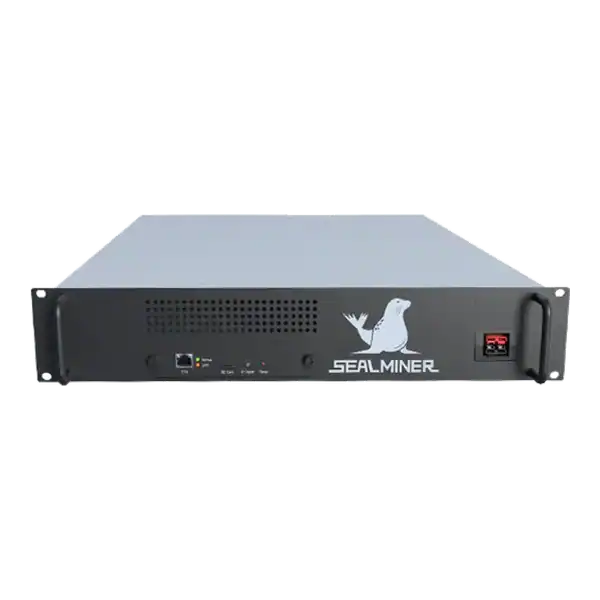

886TH
HASHRATE
9.45W/TH
EFFICIENCY
8373W
POWER
£857.66
EST. MONTHLY
NO PAYBACK
EST. ROI
Avalon home miner firmware update: Match the firmware to the exact Avalon model and obtain it through Canaan’s official support route, never an anonymous.
An Avalon home miner firmware update should be treated as a controlled maintenance change. The Nano 3S, Mini 3 and Avalon Q are separate models with different hardware and operating envelopes. So a file or instruction for one must not be assumed to suit another.
Canaan directs owners to its official resource and download pages and describes FMS, AvalonBuddy and AvalonUpgradeTool routes for supported equipment.
Before changing a working miner, identify the exact model, save settings and evidence, provide stable power and network access, get the official file, define recovery, update one unit, and prove accepted work and thermal stability afterwards.
Avalon home miner firmware update: The purpose of an update must be written down. Security, fault correction, hardware support and a documented stability improvement can justify change.
A mining technician is checking Avalon home miner firmware update. Write the intended outcome before looking at a headline hashrate. The correct comparison changes when the available circuit, sound limit, heat demand, pool route or expected ownership period changes.
The purpose of an update must be written down. Security, fault correction, hardware support and a documented stability improvement can justify change. A newer date alone does not prove that a working home miner needs immediate alteration.
Canaan’s support service points users to its official firmware and document download page. The current resource page filters files by series and model. This is important because an Avalon Home name does not create cross-model compatibility.
Canaan also describes several supported routes, including the miner management page, AvalonBuddy and AvalonUpgradeTool. Choose the method documented for the exact product and local environment rather than mixing steps from separate tools.
Write the intended outcome before looking at a headline hashrate. A learning device, a useful room heater, a quiet home miner and a commercially productive machine are different purchases. The correct comparison changes when the available circuit, sound limit, heat demand, pool route or expected ownership period changes.
Use a dated decision sheet and keep manufacturer claims separate from measured results. Record the exact model, variant, power supply, firmware and operating mode. Similar product names do not make accessories, voltage, firmware or thermal limits interchangeable.

Photograph the label and record model, serial, current firmware, hardware revision where shown, operating mode and power supply. Export or transcribe every pool endpoint, worker, payout route, network setting and user configuration needed for recovery.
Download the file directly from Canaan over a trusted connection and retain its filename, release date, description and checksum when one is published. Do not rename a package in a way that obscures its original model identity.
Read the release information for prerequisites, reset behaviour and known limitations. A firmware package can be genuine yet unsuitable when the miner is already on an incompatible branch or uses a different controller revision.
Prefer the manufacturer specification, manual and firmware portal for identity and limits. But treat them as the starting point rather than a promise of site performance. Keep a copy of the pages and files used because support pages, downloads and product revisions can change.
Ask the seller for a serial photograph, condition statement, included accessories and a recent operating record for the actual unit. A generic product image cannot prove board revision, power supply condition, repair history or whether the miner reaches stable accepted work.
Use a stable approved power supply and prevent interruption for the whole update and reboot. Do not update during a storm, unstable renewable interval, overloaded circuit or remote session with no person able to isolate and recover the device.
Perform the change from the trusted management network. Confirm that the browser or management tool is connected to the intended serialised miner and that no automated fleet process will reboot or reconfigure it midway.
Keep cooling unobstructed during reboot and first run. A home miner can return with a changed fan or power profile. So the room and adaptor must not be left unattended until temperature and load have been observed.
A competent person should confirm the electrical route for the real continuous load. Check voltage, protective device, earthing, cable, connector, socket, isolation and ventilation together. Do not assume that a plug physically fitting a socket proves that the circuit is suitable for sustained operation.
Place the miner on a trusted network segment with no unnecessary inbound exposure. Change supplied credentials, use a documented wallet and pool account, set approved backup endpoints and confirm that every endpoint belongs to the intended operator before power is applied.
Create a baseline from at least wall power, inlet temperature, outlet behaviour, local hashrate, accepted pool work, fan state and error log. A successful web message only proves that the interface completed a step.
After updating, verify the version and every network, pool and payout field before judging performance. Run long enough for temperatures and the pool estimate to stabilise, then compare the same operating mode and similar ambient conditions.
If the release changes performance, calculate efficiency from wall power divided by accepted work. Do not claim an improvement from a higher local number while rejected shares, adaptor load or sound has also increased.
Measure power at the wall and compare local hashrate with accepted pool work over a representative period. Local display figures can look healthy while stale shares, invalid work, reconnects or a wrong payout address reduce useful output.
Calculate revenue and cost over a range, not one favourable day. Include electricity, pool fees, auxiliary cooling, maintenance, downtime, conversion costs and hardware value. For a heat-use case, credit only heat that replaces a cost the owner would otherwise incur.
| Risk | Evidence to get | Control |
|---|---|---|
| Wrong model file | Label, model filter and release description | Stop unless all identities agree |
| Power loss during update | Circuit and outage plan | Use stable supply and local recovery |
| Lost payout settings | Saved configuration and address check | Restore and verify before hashing |
| Changed thermal behaviour | Before and after temperature log | Observe heat soak and approved limits |
| Fleet-wide fault | Single-unit pilot result | Use staged rollout with a pause gate |
Rank each risk by consequence and by the practical ability to detect it before purchase. A low-priced machine with uncertain firmware, exhausted cooling or a weak algorithm market can require more working capital and attention than a newer unit with a higher invoice price.
Set written stop conditions. Examples include an unsafe supply, unavailable official firmware, rejected work above the approved limit, repeated thermal shutdown, no lawful payout route or an energy break-even price below the contracted rate. A stop condition prevents sunk cost from becoming the reason to continue.
Update one non-critical device and watch the complete reboot. Confirm the management interface returns on the intended address, the correct boards are detected and the fan or heating behaviour remains suitable for the room.
Use the same pool account and operating mode as the baseline where possible. Check accepted work, not merely connection, and retain the post-update log before authorising another unit.
Begin with one unit or the smallest sensible batch. Photograph labels and connections, export the original configuration, note ambient conditions and record the start time. Watch the kernel or system log, board detection, fan behaviour, temperatures, local hashrate, pool connection and accepted work.
Do not declare acceptance from a short dashboard snapshot. Run long enough to expose heat soak, intermittent network faults and pool variance. Retain the test record with the invoice, serial number, firmware file and any seller correspondence so a later repair or warranty question has a clear baseline.
The checklist is deliberately evidence based. Marketing language such as home friendly, efficient or profitable has no fixed meaning without a measured operating mode and a real site boundary. The record should make it possible for another competent person to reproduce the decision.
Avalon home miner firmware update: The purpose of an update must be written down. Security, fault correction, hardware support and a documented stability improvement can justify change.
The purpose of an update must be written down. Security, fault correction, hardware support and a documented stability improvement can justify change.
Photograph the label and record model, serial, current firmware, hardware revision where shown, operating mode and power supply.
Use a stable approved power supply and prevent interruption for the whole update and reboot.
A safe Avalon home miner firmware update preserves a reproducible route back to known operation. Identify the exact device, use Canaan’s official model-filtered resources, save the complete configuration, protect power and cooling, and update one machine first. The job is complete only when the intended version, payout route, thermal behaviour and accepted work have been proven against the baseline.
Use The Mining Shop UK tools and support pages to compare the exact hardware against your real electricity, installation, pool and operating constraints before ordering or commissioning it.
Match the firmware to the exact Avalon model and get it through Canaan's official support route, never an anonymous mirror. Record configuration, version, wallet and pool settings, then provide stable power and a tested recovery method before starting.

Stock firmware provenance restoration: restore stock firmware provenance before ASIC resale using exact hardware identity, official files, configuration.
Plan a WhatsMiner batch firmware rollout using model cohorts, WhatsMinerTool, pilot gates, configuration evidence, monitoring and a tested rollback route.
ASICBoost compatibility check: Verify explicit model, firmware and pool support for overt ASICBoost before enabling it. Verify the current evidence.
Join the ASIC Mining Discussion
Members can read and join the discussion
Log in to read comments from other miners. Create a free account if you would like to ask a question or share your experience.
Membership helps us protect the discussion from spam and keep answers useful.